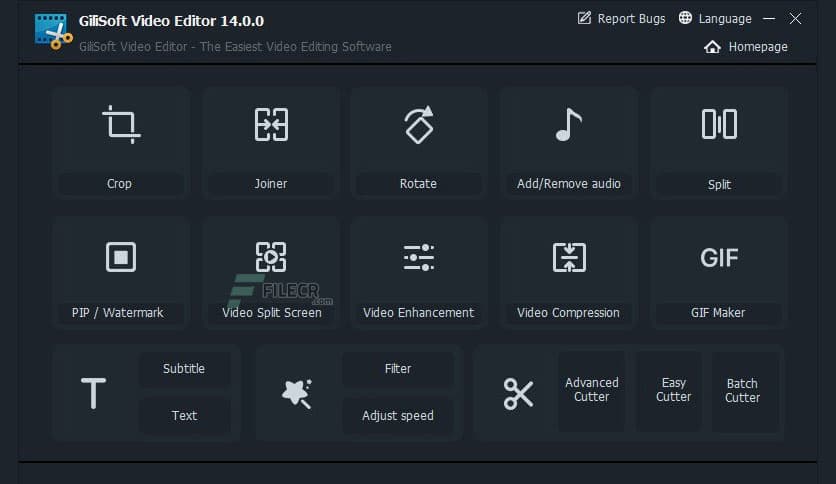
Free Download GiliSoft Video Editor for Windows PC. It may help you create high-quality edited videos, cut and join clips with zero quality loss, apply stylish video effects and filters, add music and titles, and more.
Overview of GiliSoft Video Editor
Most videos serve a purpose, such as telling a story or providing information. With this program, you can select the best footage, remove unwanted material, combine the best material into a movie, add effects, graphics, music, and text, and adjust the video’s style, pace, or mood.
GiliSoft Video Splitter is the perfect video-splitting software for splitting video files into multiple segments quickly and easily. It supports time-based splitting, for example, every 600 seconds (5 minutes) per segment. It supports file-size-based splitting, such as 100 MB per segment. It supports custom splits; you can set the split point manually.
GiliSoft Video Editor lets you adjust video speed and apply a range of picture effects (Black and White, Old Film, Embossment, Carving, Wood Carving, Pencil, Posterize, Oil Painting, etc., Mosaic, Negative, Glow, Haze, Fog, Motion Blur) to the video. It supports instant previews, and you can simultaneously adjust video brightness, contrast, and saturation.
It is common to shoot far more footage than you need and choose only the best material for the final edit. GiliSoft Video Editor’s Easy Cutter can quickly split a long video file into multiple smaller segments with no quality loss. Often, you will shoot several versions (takes) of a shot and choose the best one when editing. The Batch Cutter in this program lets you cut multiple video files simultaneously.
Features of GiliSoft Video Editor
- Powerful Video Cutting Function
- Advanced Video Cutting Function
- Powerful Video Joiner
- Powerful Video Splitter
- Adjust Video Speed, Add Effects
- Add a Watermark, Make Picture in Picture Video
- Add Subtitle to Video
- Adding Music to Video
- Rotate Video
- Easy Video Cropper
Technical Details and System Requirements
- Supported OS: Windows 11, Windows 10, Windows 8.1, Windows 7
- RAM (Memory): 2 GB RAM (4 GB recommended)
- Free Hard Disk Space: 2 GB or more








Comments
Leave a comment
Your email address will not be published. Required fields are marked *