Free Download PDFArea PDF to Image Converter full version standalone offline installer for Windows. This quick, easy-to-use batch PDF converter converts PDF documents to image files.
Overview of PDFArea PDF to Image Converter
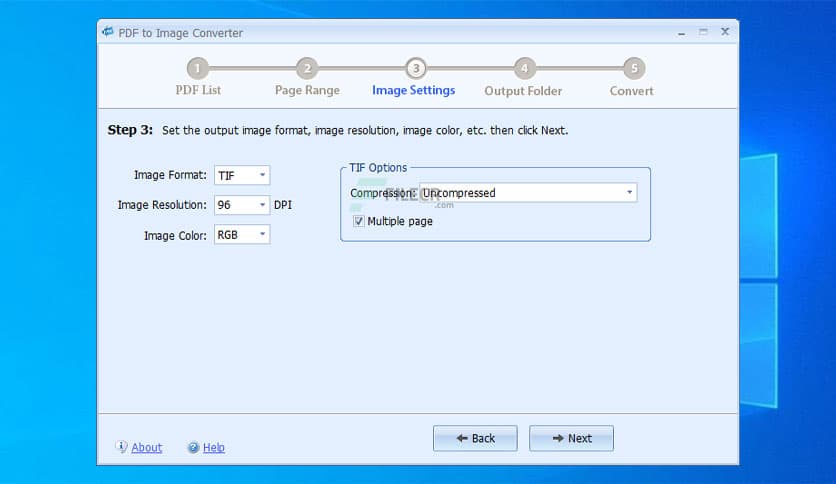
This quick, easy-to-use batch PDF converter converts PDF documents to image files. The output image can be in JPG, TIF, GIF, PNG, JP2 (JPEG 2000), BMP, or EMF format.
It can convert encrypted PDF documents and supports converting all pages or selected pages. It is standalone software, and Adobe Acrobat Reader is not required. It doesn’t require a print driver, so it will not install one on your computer.
Features of PDFArea PDF to Image Converter
- Quickly converts PDF documents to image files
- Supports many popular image formats
- Does NOT need to install Adobe Acrobat software
- Doesn’t depend on any print driver
- Batch converts PDF documents
- Supports command line
- Supports encrypted PDF documents
- Supports RGB/CYMK/Gray/Lab color
- Supports multi-page TIF format
- You may choose to convert all pages or specified pages
- Converts PDF to vector format (EMF)
Technical Details and System Requirements
- Supported OS: Windows 11, Windows 10, Windows 8.1, Windows 7
- RAM (Memory): 2 GB RAM (4 GB recommended)
- Free Hard Disk Space: 200 MB or more






Comments
Leave a comment
Your email address will not be published. Required fields are marked *